How to Troubleshoot the AcuraLink (With AcuraLink (USA With Navigation))
How to Troubleshoot the AcuraLink
How to Check for DTCs with the HDS
1. Make sure the ignition switch is in LOCK (0).
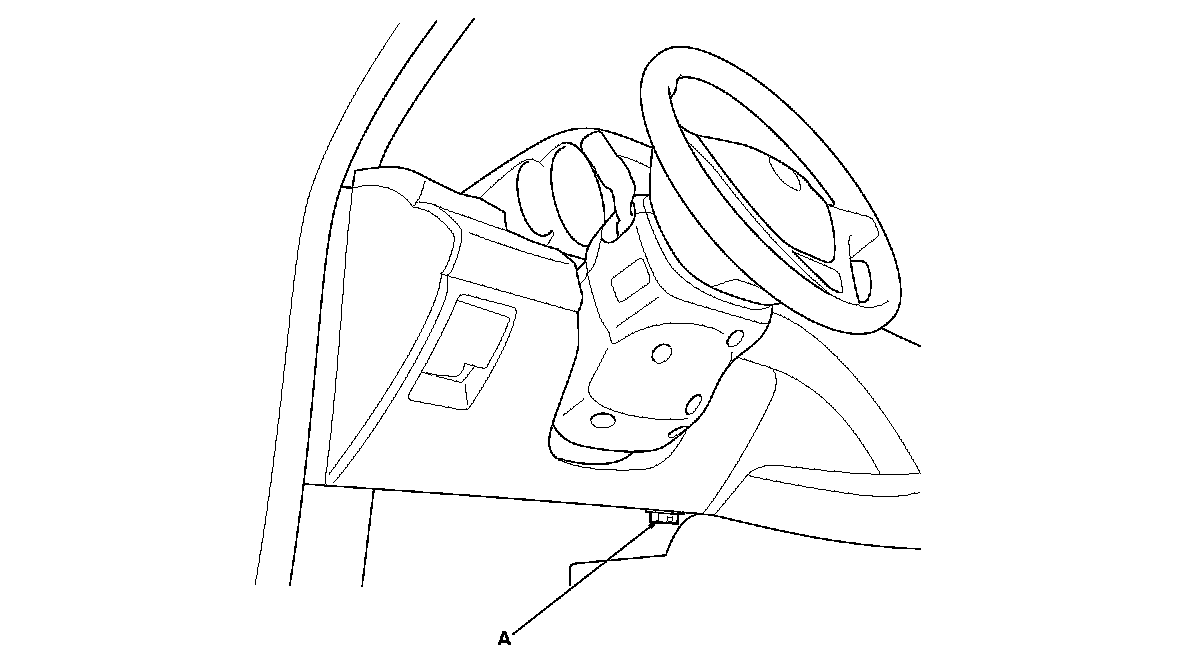
2. Connect the HDS to the data link connector (DLC) (A) located under the driver's side of the dashboard.
3. Turn the ignition switch to ON (II).
4. Make sure the HDS communicates with the vehicle and the AcuraLink control unit (XM receiver). If it doesn't, troubleshoot the DLC circuit. Testing and Inspection
5. Select XM/HIP in the BODY ELECTRICAL menu.
6. Select DTCs in the XM/HIP menu.
7. Check for DTCs. If any DTCs are indicated, write down the DTCs, then go to the indicated DTC troubleshooting. If no DTCs are indicated, refer to symptom troubleshooting.
NOTE: After troubleshooting, clear the DTCs with the HDS.
Deleting the AcuraLink Messages (with the HDS)
To delete all messages including Recall and Diagnostic Info:
1. Connect the HDS to the data link connector (DLC).
2. Using the HDS, go to the BODY ELECTRICAL menu, select XM/HIP, then select HIP RESET menu, select DTC Log Data Clear and follow the HDS on screen instructions.
Deleting the AcuraLink Messages (without HDS) (To delete a single message)
NOTE: Diagnostic info and recall/campaign messages can only be deleted with HDS.
1. Press the INFO button to bring up the Information screen.
2. Scroll to the Message option, then select it by pressing ENTER on the interface selector.
3. Select the message category that contains the message you want to delete.
4. Use the interface knob to scroll up or down to the message title you want to delete, and select it by pressing ENTER on the interface selector.
5. Scroll to Delete with the interface knob, and select it by pressing ENTER on the interface selector.
Deleting the AcuraLink Messages (without HDS) (To delete all message)
NOTE: The Delete All Messages command does not apply to Diagnostic Info and Recall messages. They can only be deleted with HDS.
1. Press the SETUP button to view the setup screen.
2. Select MORE by pushing the interface selector to the right.
3. Use the interface knob to scroll to the AcuraLink/Messages button, and select it by pressing ENTER on the interface selector.
4. Scroll to the Delete Messages option, and select it by pressing ENTER on the interface selector.
5. Scroll to the category with the messages you want to delete, and select the category by pressing ENTER on the interface selector.