Symptom Troubleshooting
Symptom Troubleshooting: Voice guidance cannot be heard, is broken up, or there is static
Voice guidance cannot be heard, is broken up, or there is static
Diagnostic Test: Navi System Link
NOTE:
- Make sure that the correct DVD color and version are installed.
- Inspect the DVD for dirt or damage.
- Check the navigation volume level (see Owner's Manual).
- Check the connectors for poor connections or loose terminals.
- Before troubleshooting, make sure you have anti-theft codes for the audio system and navigation system.
- After troubleshooting, enter the anti-theft codes for the audio system and navigation system.
- Check the vehicle battery condition first.
1. Turn the ignition switch to ON (II).
2. Press the display unit SET-UP button.
3. Check the volume and voice feedback setting for the navigation system in set-up.
Is either set to OFF?
YES - Set the voice feedback to ON, and select an audible level for the volume.
NO - Go to step 4.
4. Check the radio operation.
Can you hear the radio?
YES - Go to step 5.
NO - Troubleshoot audio system.
5. Go into the Diagnostic mode, and use the Navi System Link diagnostic Navigation System Diagnostic Mode (With Navigation) to check the radio.
Is the Radio icon red?
YES - Troubleshoot the audio system.
NO - Go to step 6.
6. Turn the ignition switch to LOCK (0).
7. Disconnect navigation unit connector B (14P) and the stereo amplifier connector A (28P).
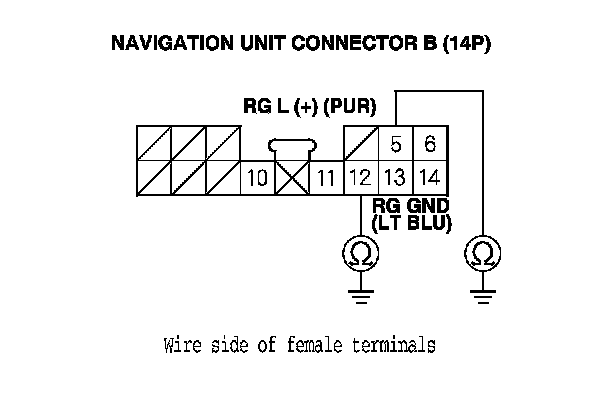
8. Check for continuity between body ground and navigation unit connector B (14P) terminals No. 5 and No. 12 individually.
Is there continuity?
YES - Repair short to body ground in the wire between the navigation unit and stereo amplifier units. Replace the affected shielded harness.
NO - Go to step 9.
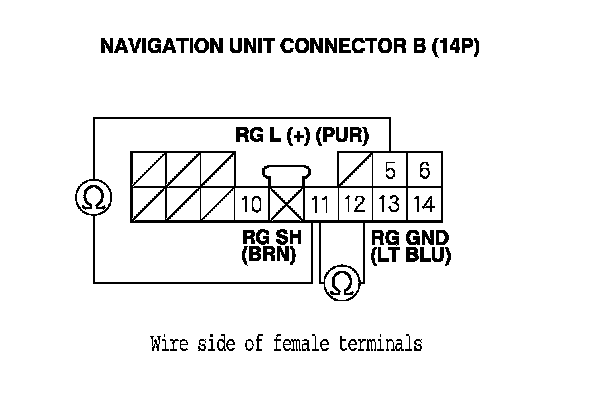
9. Check for continuity between navigation unit connector B (14P) terminal No. 11 and terminals No. 5 and No. 12 individually.
Is there continuity?
YES - Repair short to body ground in the wire between the navigation unit and stereo amplifier units. Replace the affected shielded harness.
NO - Go to step 10.
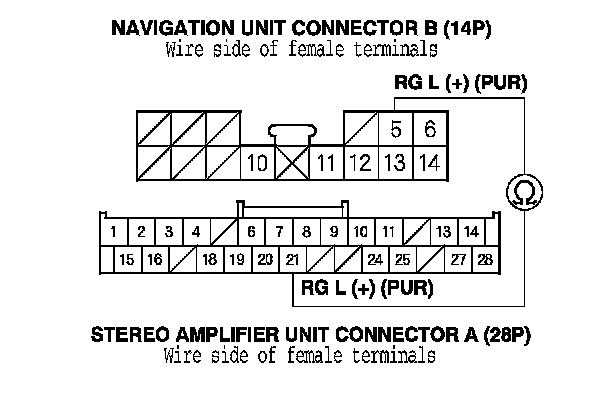
10. Check for continuity between navigation unit connector B (14P) terminal No. 5 and the stereo amplifier unit connector A (28P) terminal No. 21.
Is there continuity?
YES - Go to step 11.
NO - There is an open in the circuit between the navigation unit and stereo amplifier. Check for poor connections or loose terminals at the stereo amplifier and navigation unit. If a poor connection or loose terminal is found, replace the affected shielded harness.
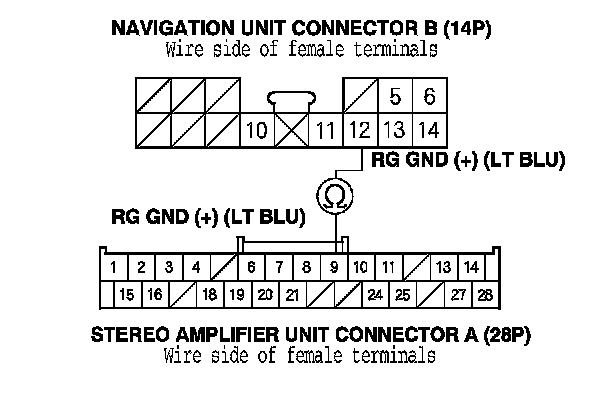
11. Check for continuity between navigation unit connector B (14P) terminal No. 12 and the stereo amplifier unit connector A (28P) terminal No. 9.
Is there continuity?
YES - Go to step 12.
NO - There is an open in the circuit between the navigation unit and the stereo amplifier. Check for poor connections or loose terminals at the stereo amplifier and navigation unit. If a poor connection or loose terminal is found, replace the affected shielded harness.
12. Substitute a known-good stereo amplifier, and recheck.
Is the system OK?
YES - Replace the stereo amplifier.
NO - Replace the navigation unit. Service and Repair