B1170
DTC Troubleshooting: B1170
DTC B1170: Gauge Control Module Lost Communication with the VSA Modulator-Control Unit (VSA Message)
1. Clear the DTCs with the HDS.
2. Turn the ignition switch to LOCK (0) and then back ON (II).
3. Wait for more than 6 seconds.
4. Check for DTCs with the HDS.
Is DTC B1170 indicated?
YES - Go to step 5.
NO - Intermittent failure, the system is OK at this time. Check for loose or poor connection between the gauge control module and the VSA modulator-control unit.
5. Check for VSA System DTCs with the HDS. Initial Inspection and Diagnostic Overview
Are there any DTCs indicated?
YES - Go to the indicated DTCs, then recheck.
NO - Go to step 6.
6. Turn the ignition switch to LOCK (0).
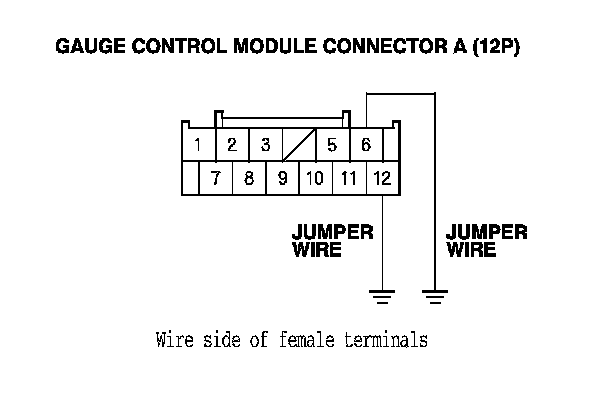
7. Disconnect gauge control module connector A (12P).
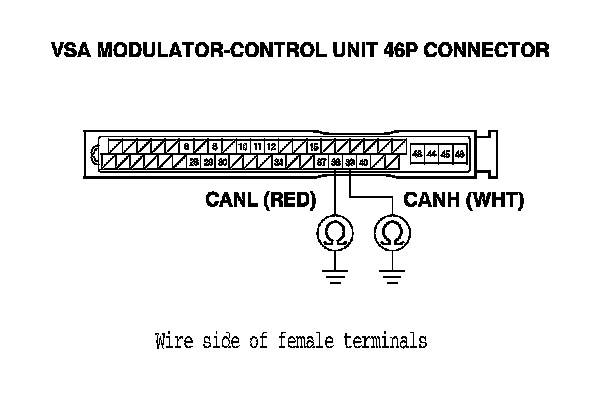
8. Disconnect the VSA modulator-control unit 46P connector.
9. Connect gauge control module connector A (12P) connector terminals No. 6 and No. 12 and body ground with jumper wires.
10. Check for continuity between body ground and VSA modulator-control unit 46P connector terminals No. 38 and No. 39 individually.
Is there continuity?
YES - Substitute a known-good VSA modulator-control unit Service and Repair, and recheck. If the indication goes away, replace the original VSA modulator-control unit. Service and Repair If the DTC is still present, replace the gauge control module. Service and Repair
NO - Repair open in the wire.