Dash Lights Brightness Controller and Odometer Select/Reset Button Test/Replacement
- Remove the subdisplay visor (see
SUBDISPLAY VISOR REMOVAL/INSTALLATION
) and disconnect the connectors.
- Remove the two screws and the dash lights brightness controller-odometer select/reset button (A).
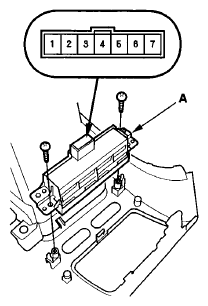 Courtesy of AMERICAN HONDA MOTOR CO., INC.
- Check for continuity between the terminals in each switch position according the table.
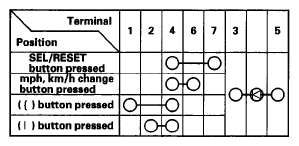 Courtesy of AMERICAN HONDA MOTOR CO., INC.
- If the continuity is not as specified, replace the dash lights brightness controller-odometer select/reset button.