Low Tire Pressure Indicator Does Not Come on, and No DTCs Are Stored
Low tire pressure indicator does not come on, and no DTCs are stored ('07 model)NOTE: Check for gauge DTCs with the HDS. If gauge DTCs are stored, troubleshoot these DTCs first.
1. Turn the ignition switch to ON (II).
2. Check the low tire pressure indicator for several seconds when the ignition switch is turned to ON (II).
Did the indicator come on and then go off?
YES - Go to step 3.
NO - Do the troubleshooting for the gauge control module. If necessary, substitute a known-good gauge control module, and recheck.
3. Lower the pressure in any tire until the low tire pressure indicator comes on.
NOTE: If 5 minutes has passed since the ignition switch has been turned to ON (II), turn the ignition switch to LOCK (0) and wait 2 minutes, then turn back ON (II) again.
Does the indicator come on when the pressure drops below 175 kPa (1.8 kgf/cm2, 25 psi) or less?
YES - the system is OK at this time.
NO - Go to step 4.
4. Check the TIRE PRESSURE in the TPMS DATA LIST with the HDS, and compare with measured actual tire pressure.
NOTE: If the HDS screen shows UNDEFINED for sensor status, turn the ignition switch to LOCK (0), rotate the appropriate tire 1/4 turn, then turn the ignition switch to ON (II), and try again. If UNDEFINED is still shown, repeat the procedure in the previous sentence until NORMAL is shown.
Is the indicated tire pressure on the HDS within 40 kPa (0.4 kgf/cm2, 6 psi) of the actual tire pressure?
YES - Go to step 5.
NO - Replace the tire pressure sensor.
5. Turn the ignition switch to LOCK (0).
6. Disconnect the TPMS control unit 20P connector.
7. Measure voltage between TPMS control unit 20P connector terminals No. 4 and No. 8.
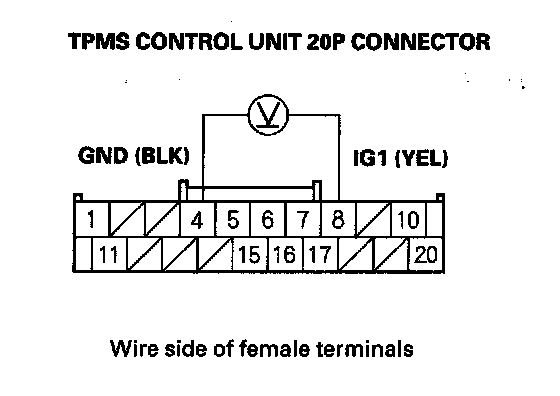
Is there battery voltage?
YES - Repair short to power in the wire between the TPMS control unit and the No. 21 (7.5 A) fuse in the under-dash fuse/relay box.
NO - Check for loose terminals and poor connections at the TPMS control unit. If necessary, substitute a known-good TPMS control unit, and recheck.
Low tire pressure indicator does not come on, and no DTCs are stored ('08 model)
1. Turn the ignition switch to ON (II).
2. Check the low pressure indicator for several seconds when the ignition switch is turned to ON (II).
Did the indicator come on and then go off?
YES - Go to step 3.
NO - Do the troubleshooting for the gauge control module. If necessary, substitute a known-good gauge control module, and recheck.
3. Lower the pressure in any tire until the low tire pressure indicator comes on.
NOTE: If 5 minutes has passed since the ignition switch has been turned to ON (II), turn the ignition switch to LOCK (0) and wait 2 minutes, then turn back ON (II) again.
Does the indicator come on when the pressure drops below 175 kPa (1.8 kgf/cm2, 25 psi) or less?
YES - the system is OK at this time.
NO - Go to step 4.
4. Check the TIRE PRESSURE in the TPMS DATA LIST with the HDS, and compare with measured actual tire pressure.
NOTE: If the HDS screen shows UNDEFINED for sensor status, turn the ignition switch to LOCK (0), rotate the appropriate tire 1/4 turn, then turn the ignition switch to ON (II), and try again. If UNDEFINED is still shown, repeat the procedure in the previous sentence until NORMAL is shown.
Is the indicated tire pressure on the HDS within 40 kPa (0.4 kgf/cm2, 6 psi) of the actual tire pressure?
YES - Check for loose terminals and poor connections at the TPMS control unit. If necessary, substitute a known-good TPMS control unit, and recheck.
NO - Replace the tire pressure sensor.