41-2
DTC 41-2: F-CAN Malfunction (Lost Communication with VSA)NOTE: Before you troubleshoot, review the general troubleshooting information.
1. Turn the ignition switch to ON (II).
2. Make sure the HDS communicates with vehicle and the SH-AWD control unit. If it doesn't, troubleshoot the DLC circuit.
3. Check for PGM-FI DTC's with the HDS.
Are there any PGM-FI DTCs indicated?
YES - Go to the indicated DTC's troubleshooting.
NO - Go to step 4.
4. Clear the DTC with the HDS.
5. Start the engine.
6. Check for DTCs with the HDS.
Is DTC 41-2 indicated?
YES - Go to step 7.
NO - intermittent failure, the system is OK at this time. Check for intermittent open between SH-AWD control unit connector terminals A10 and A20 and VSA modulator-control unit 46P connector terminals No. 38 and No. 39.
7. Turn the ignition switch to LOCK (0).
8. Jump the SCS line with the HDS.
NOTE: this step must be done to prevent PCM damage.
9. Disconnect the VSA modulator-control unit 46P connector.
10. Connect VSA modulator-control unit 46P connector terminals No. 38 and No. 39 to body ground with jumper wires.
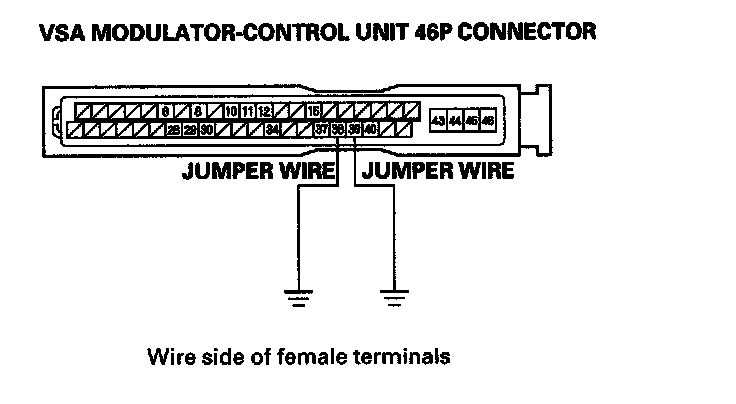
11. Disconnect SH-AWD control unit connector A (20P).
12. Check for continuity between SH-AWD control unit connector terminals A10 and A20 to body ground.
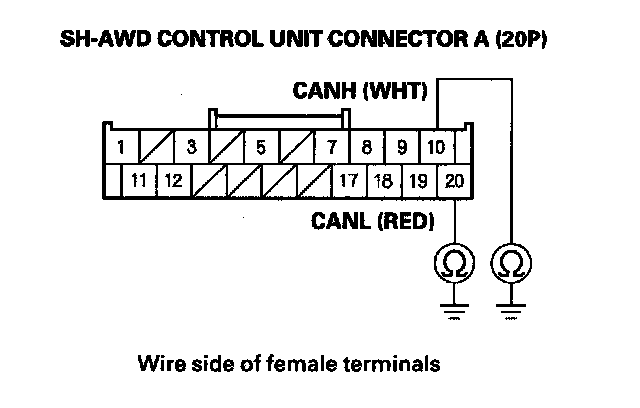
Is there continuity?
YES - Update the SH-AWD control unit if it does not have the latest software, or substitute a known-good SH-AWD control unit and recheck. If the symptom/indication goes away with the updated SH-AWD control unit, troubleshooting is complete. If the symptom/indication goes away with a known-good SH-AWD control unit, replace the original SH-AWD control unit.
NO - Repair open in the wires between the SH-AWD control unit and the VSA modulator control unit.