B1779
DTC B1779: HFL Switch or HFL-Voice Control Switch (HFLTALK/HFL BACK Buttons) Circuit Open/ShortNOTE: If you are troubleshooting multiple DTCs, be sure to follow the instructions in B-CAN system diagnosis test mode A.
1. Clear the DTCs with the HDS.
2. Turn the ignition switch OFF, then start the vehicle and turn the steering wheel back and forth several times.
3. Check for DTCs with the HDS.
Is DTC B1779 indicated?
YES - Go to step 4.
NO - Intermittent failure, the system is OK at this time.
4. Turn the ignition switch OFF.
5. Do the HFL voice control switch test.
Is the switch OK?
YES - Go to step 6.
NO - Replace the cable reel subharness.
6. Remove the glove box.
7. Disconnect the 28P connector from the HandsFreeLink control unit.
8. Disconnect the 20P connector from the cable reel subharness.
9. Turn the ignition switch ON (II).
10. Check for voltage on the cable reel subharness 20P connector terminal No. 18.
Is there voltage?
YES - Repair a short to power on BLU wire.
NO - Go to step 11.
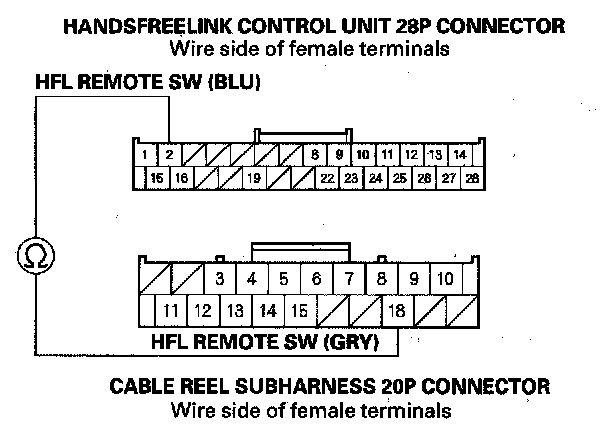
11. Check for continuity between the HandsFreeLink control unit 28P connector terminal No. 2 and cable reel subharness 20P connector terminal No. 18.
Is there continuity?
YES - Go to step 12.
NO - Repair open in the GRY wire between the switch, cable reel, and HandsFreeLink control unit.
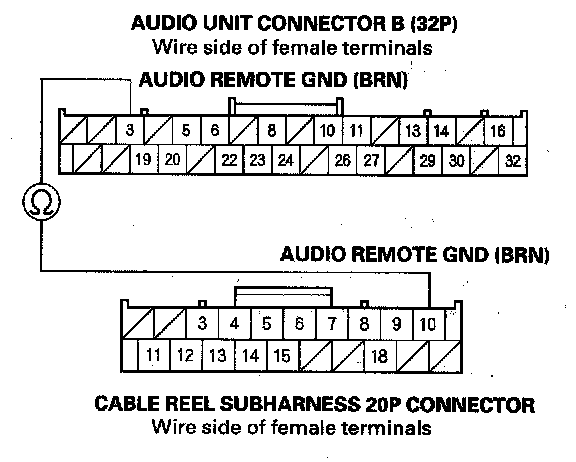
12. Check for continuity between the cable reel subharness 20P connector terminal No. 10 and the audio unit connector B (32P) terminal No. 3.
Is there continuity?
YES - Check for loose or poor connections at the audio unit, HandsFreeLink control unit, and HFL-voice control switch. If the connections are OK, substitute a known-good HandsFreeLink control unit. If the problem is gone, replace the original control unit.
NO - Repair open in the wire between the switch, cable reel, and the audio unit.