B1173
DTC B1173: Gauge Control Module Lost Communication with the TPMS Control Unit (TPMS Message)1. Clear the DTCs with the HDS.
2. Turn the ignition switch OFF, and then back ON (II).
3. Wait for 6 seconds or more.
4. Check for DTCs with the HDS.
Is DTC B1173 indicated?
YES - Go to step 5.
NO - Intermittent failure, the system is OK at this time. Check for loose or poor connection between the gauge control module and the TPMS control unit.
5. Check for TPMS DTCs with the HDS.
Are there any DTCs indicated?
YES - Go to the indicated DTCs, then recheck.
NO - Go to step 6.
6. Turn the ignition switch OFF.
7. Disconnect the gauge control module connector A (12P).
8. Disconnect the TPMS control unit 20P connector.
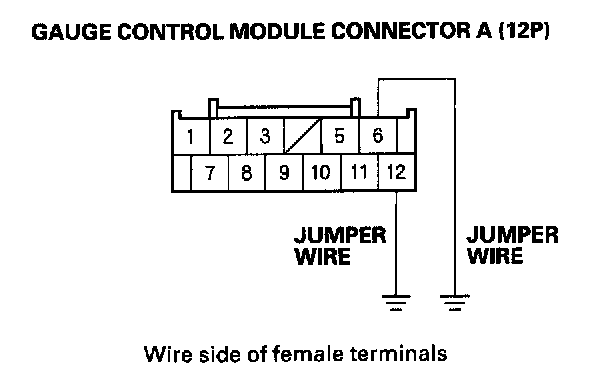
9. Connect the gauge control module connector A (12 P) connector No. 6 and No. 12 terminals and body ground with jumper wires.
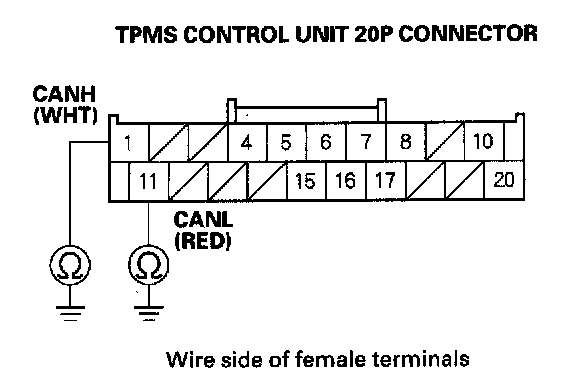
10. Check for continuity between the adaptive cruise control (ACC) unit 20P connector No. 1 and No. 11 terminals and body ground individually.
Is there continuity?
YES - Substitute a known-good TPMS control unit, and recheck. If the indication goes away, replace the original TPMS control unit. If the DTC is still present, replace the gauge control module.
NO - Repair open in the wire.