Driver's Airbag Replacement: Installation
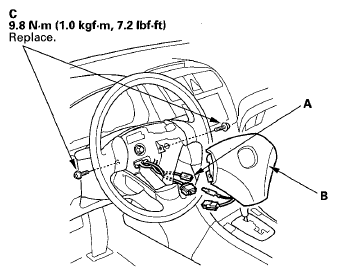
- Connect the horn switch connector (1P) (A) to the driver's airbag.
 Courtesy of AMERICAN HONDA MOTOR CO., INC.
- Place the new driver's airbag (B) in the steering wheel, and secure it with new TORX bolts (C).
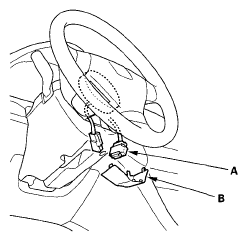
- Connect the cable reel 4P connector (A) to the driver's airbag 4P connector, then install the access panel (B) on the steering wheel.
 Courtesy of AMERICAN HONDA MOTOR CO., INC.
- Reconnect the negative cable to the battery.
- After installing the airbag, confirm proper system operation:
- Turn the ignition switch ON (II); the SRS indicator should come on for about 6 seconds and then go off.
- Make sure the horn works.