The Other Caller cannot Hear Your Voice, or Your Voice is too Quiet or Distorted
NAVIGATION / MULTI INFO DISPLAY: NAVIGATION SYSTEM: The Other Caller cannot Hear Your Voice, or Your Voice is too Quiet or Distorted
- The Other Caller cannot Hear Your Voice, or Your Voice is too Quiet or Distorted
INSPECTION PROCEDURE
PROCEDURE
1. CHECK CELLULAR PHONE
(a) Check if the other caller can hear your voice properly.
OK:
Your voice can be heard correctly.
NG -- CELLULAR PHONE IS FAULTY
OK -- Continue to next step.
2. CHECK SETTINGS
(a) Check if the mute switch is set to on.
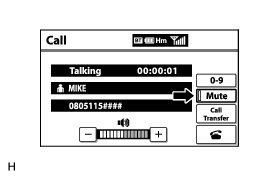
OK:
Mute switch is not set to on.
NG -- TURN MUTE SWITCH OFF
OK -- Continue to next step.
3. CHECK MICROPHONE (NAVIGATION CHECK MODE)
(a) Enter "Microphone & Voice Recognition Check" (Check Mic & Voice Recognition) Operation Check.
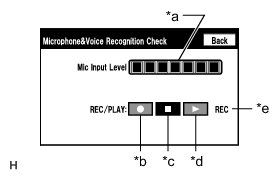
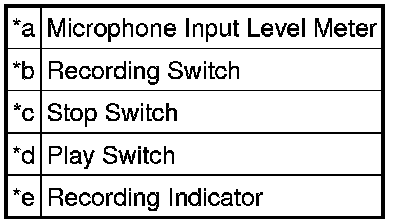
(b) When voice is input into the microphone, check that the microphone input level meter changes according to the input voice.
(c) Push the recording switch and perform voice recording.
HINT
* Select the recording switch with the blower motor of the air conditioning system stopped. If an outlet of the air conditioning system is facing the microphone, noise may be recorded.
* Voice can be recorded for up to 5 seconds.
(d) Check that the recording indicator remains on while recording and that the recorded voice is played normally without noise or distortion.
OK:
All check results are normal.
Text in Illustration
NG -- PROCEED TO NEXT SUSPECTED AREA SHOWN IN PROBLEM SYMPTOMS TABLE Problem Symptoms Table
OK -- REPLACE DISPLAY AND NAVIGATION MODULE DISPLAY Removal