Illumination for Panel Switch does not Come on with Tail Switch ON
AUDIO / VIDEO: AUDIO AND VISUAL SYSTEM: Illumination for Panel Switch does not Come on with Tail Switch ON
Illumination for Panel Switch does not Come on with Tail Switch ON
INSPECTION PROCEDURE
PROCEDURE
1. CHECK VEHICLE SIGNAL (DISPLAY CHECK MODE)
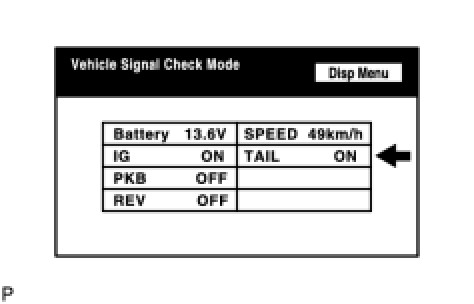
(a) Enter the "Display Check" mode and select "Vehicle Signal Check Mode" Operation Check.
(b) Check that the display changes between ON and OFF according to the light control switch operation.
OK:

HINT:
This display is updated once per second. As a result, it is normal for the display to lag behind the actual change in the switch.
Result

C -- PROCEED TO NEXT CIRCUIT INSPECTION SHOWN IN PROBLEM SYMPTOMS TABLE
B -- REPLACE MULTI-DISPLAY ASSEMBLY
A -- REPLACE DISPLAY AND NAVIGATION MODULE DISPLAY