DTC 80-10
NAVIGATION / MULTI INFO DISPLAY: NAVIGATION SYSTEM: 58-10: Gyro Error
DTC 58-10 - Gyro Error
DTC 80-10 - Gyro Error
DESCRIPTION

INSPECTION PROCEDURE
HINT:
After the inspection is completed, clear the DTCs Reading and Clearing Diagnostic Trouble Codes.
PROCEDURE
1. CHECK VEHICLE SENSOR (NAVIGATION CHECK MODE)
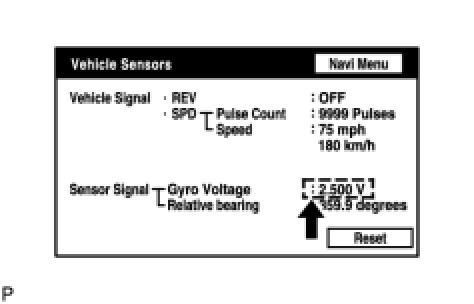
(a) Enter the "Navigation Check" mode and select "Vehicle Sensors" Operation Check.
(b) Check the gyro voltage.
Standard voltage:
0.5 to 4.5 V
NG -- REPLACE DISPLAY AND NAVIGATION MODULE DISPLAY
OK -- Continue to next step.
2. CLEAR DTC
(a) Clear the DTCs Reading and Clearing Diagnostic Trouble Codes.
NEXT -- Continue to next step.
3. RECHECK DTC
(a) Recheck for DTCs and check if the same trouble code is output.
HINT:
If DTCs are output frequently, replace the display and navigation module display.
OK:
No DTC is output.
NG -- REPLACE DISPLAY AND NAVIGATION MODULE DISPLAY
OK -- USE SIMULATION METHOD TO CHECK