Ignition Lock Cylinder Case Replacement
Ignition Lock Cylinder Case Replacement
Removal Procedure
1. Remove the ignition lock cylinder. Refer to Ignition Lock Cylinder Replacement (Ignition Lock Cylinder Replacement) .
2. Remove the multifunction turn signal switch housing. Refer to Multifunction Turn Signal Switch Housing Replacement (Multifunction Turn Signal Switch Housing Replacement) .
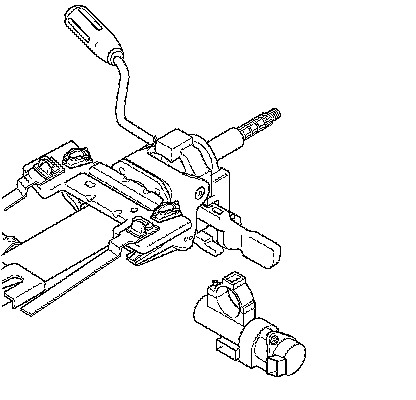
3. Remove the shear bolt from the ignition lock cylinder case using a hammer and chisel.
4. Remove the ignition lock cylinder case.
Installation Procedure
1. Install the ignition lock cylinder case.
Notice: Refer to Fastener Notice (Fastener Notice) .
2. Install the ignition lock cylinder case bolt and tighten it until the head shears off.
3. Install the multifunction turn signal switch. Refer to Multifunction Turn Signal Switch Housing Replacement (Multifunction Turn Signal Switch Housing Replacement) .
4. Install the ignition lock cylinder. Refer to Ignition Lock Cylinder Replacement (Ignition Lock Cylinder Replacement) .
5. The passlock sensor is part of the ignition switch. If replacing the ignition switch, a passlock relearn will be needed. Refer to Control Module References (Programming and Relearning) .