Diagnostic Routine D
Diagnostic Routine D
Diagnostic Overview
U210A:16 Or U210A:17
Normal Operation and Fault Conditions
REFER to Head Up Display (HUD) Module Collision Avoidance.
DTC Fault Trigger Conditions

Pinpoint Test
1. CHECK FOR HUD (Head Up Display) MODULE DTCs (Diagnostic Trouble Codes)
1. Turn the engine off.
2. Ignition ON.
3. Using a scan tool, clear the HUD (Head Up Display) module continuous memory DTCs (Diagnostic Trouble Codes).
4. Carry out the HUD (Head Up Display) module self-test.
Is DTC (Diagnostic Trouble Code) U210A:16 or DTC (Diagnostic Trouble Code) U210A:17 present?

2. CHECK FOR CORRECT HUD (Head Up Display) MODULE OPERATION
1. Disconnect the HUD (Head Up Display) module connector.
2. Repair:
- corrosion (install new connector or terminals - clean module pins)
- damaged pins - install new terminals/pins
- pushed-out pins - install new pins as necessary
3. Reconnect the HUD (Head Up Display) module connector. Make sure it seats and latches correctly.
4. Operate the system and determine if the concern is still present.
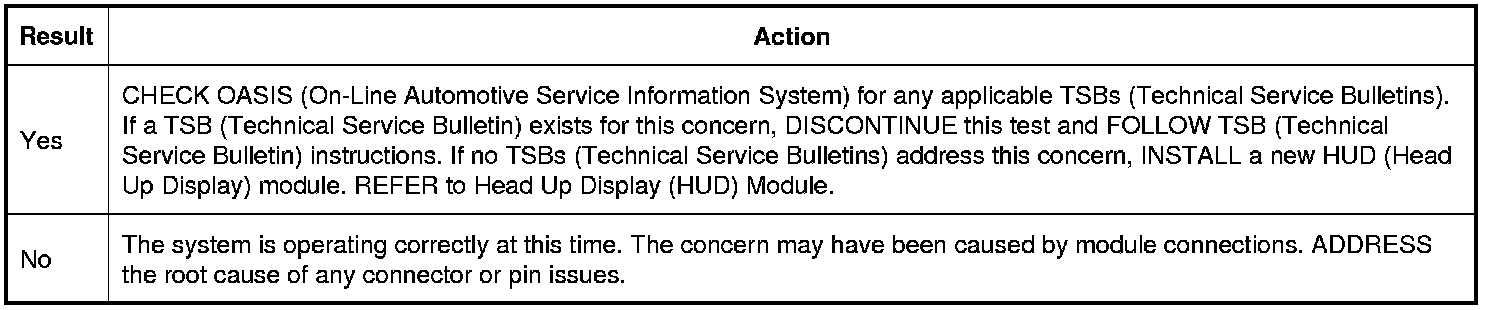
Is the concern still present?