Pinpoint Test I: DTC B2048, B2049, B2050, B2051, B2949, B2A2B, B2A2C, B2A37 Or B2A38
Smart Junction Box (SJB)
Pinpoint Tests
Pinpoint Test I: DTC B2048, B2049, B2050, B2051, B2949, B2A2B, B2A2C, B2A37 Or B2A38
Normal Operation
If the Smart Junction Box (SJB) is not configured correctly, these DTCs may appear in error. The SJB needs to be configured correctly, possibly using the As-Built data, in order to correct this issue and clear the DTCs. If not, then the following pinpoint test needs to be carried out to determine if the SJB is at fault. If the SJB connectors have been contaminated (water, dirt or metal shavings), that may also cause this issue.
NOTE: The pins mentioned in the chart below are not populated.
NOTE: These DTCs are not applicable to a correctly configured vehicle. If they are present, the vehicle may have been incorrectly configured, there may be contaminants in the connectors such as water, dirt or metal shavings, or the SJB may be damaged.
B2A2B-B2949:
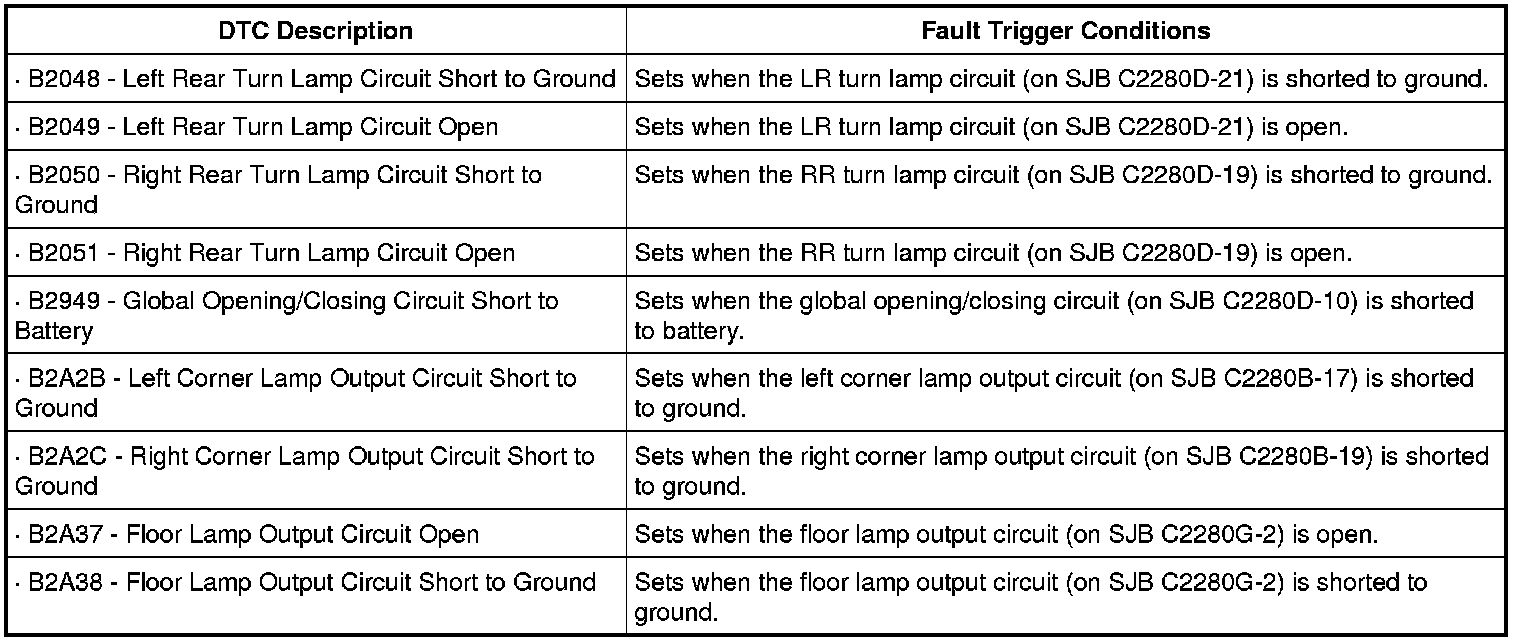
This pinpoint test is intended to diagnose the following:
- SJB
PINPOINT TEST I: DTC B2048, B2049, B2050, B2051, B2949, B2A2B, B2A2C, B2A37 OR B2A38
-------------------------------------------------
I1 CHECK FOR CORRECT SJB CONFIGURATION
- NOTE: It may be necessary to use the As-Built database in order to correctly configure the SJB. Refer to Information Bus.
- Check the SJB configuration by monitoring the DataLogger PIDs, and if necessary, configure the SJB to the correct configuration specifications.
- Enter the following diagnostic mode on the scan tool: Clear the DTCs.
- Enter the following diagnostic mode on the scan tool: Repeat the Self-Test.
- Is DTC B2048, B2049, B2050, B2051, B2949, B2A2B, B2A2C, B2A37, or B2A38 retrieved (or any combination of the previously mentioned DTCs)?
Yes
GO to I2.
No
The system is operating correctly at this time. The concern may have been caused by a loose or corroded connector. CLEAR the DTCs. REPEAT the self-test. TEST the system for normal operation.
-------------------------------------------------
I2 CHECK FOR CORRECT SJB OPERATION
- Disconnect all the SJB connectors.
- Check for:
- corrosion
- damaged pins
- pushed-out pins
- Connect all the SJB connectors and make sure they seat correctly.
- Enter the following diagnostic mode on the scan tool: Clear the DTCs.
- Enter the following diagnostic mode on the scan tool: Repeat the Self-Test.
- Is DTC B2048, B2050, B2949, B2A2B, B2A2C, B2A37, or B2A38 retrieved (or any combination of the previously mentioned DTCs)?
Yes
INSTALL a new SJB. REFER to Smart Junction Box (SJB) Service and Repair. CLEAR the DTCs. REPEAT the self-test. TEST the system for normal operation.
No
The system is operating correctly at this time. The concern may have been caused by a loose or corroded connector. CLEAR the DTCs. REPEAT the self-test. TEST the system for normal operation.
-------------------------------------------------