XM Receiver Removal/Installation
XM Receiver Removal/Installation
Without AcuraLink
SRS components are located in this area. Review the SRS component locations Locations, and the precautions and procedures Service and Repair before doing repairs or service.
1. Remove the center console Center Console Removal/Installation.
2. Remove the HandsFreeLink control unit Service and Repair.
3. Remove the audio unit Audio Unit Removal/Installation (Without Navigation).
If the vehicle is a Canada model with navigation, remove the audio-navigation unit Audio-Navigation Unit Removal/Installation.
4. Remove the bolts (A), and loosen the bolt (B).
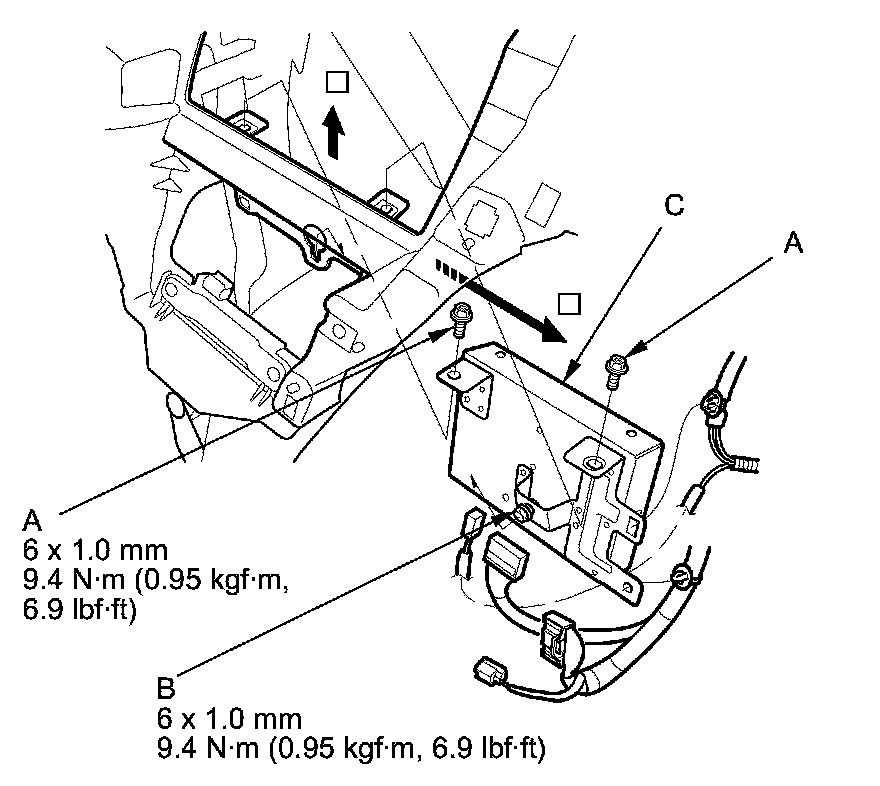
5. Pull the XM receiver (C) out, then disconnect the connectors from the XM receiver, and detach the clips.
6. Install the XM receiver in the reverse order of removal.