Symptom Troubleshooting
Symptom Troubleshooting: No picture is displayed
No picture is displayed
Diagnostic Test: Navi System Link
NOTE:
- Always check the connectors for poor connections or loose terminals.
- Before troubleshooting, make sure you have anti-theft code for the navigation system.
- Check any official Honda service website for more service information about the navigation system.
- For problems with the rearview camera, do the rearview camera does not come on or work properly troubleshooting.
- Always make sure that the correct DVD color and version are installed.
- Inspect the DVD for dirt or damage.
1. Check the No. 5 (10 A), No. 7 (10 A) fuse and No. 32 (10 A) fuse in the under-dash fuse relay box, and reinstall the fuses if they are OK.
Are the fuses OK?
YES - Go to step 2.
NO - Replace the fuse and recheck.
2. Turn the ignition switch to ON (II).
3. Operate the radio and listen to the audio.
Can you hear the audio?
YES - Go to step 4.
NO - Check the ACC circuit.
4. Turn the ignition switch to ON (II).
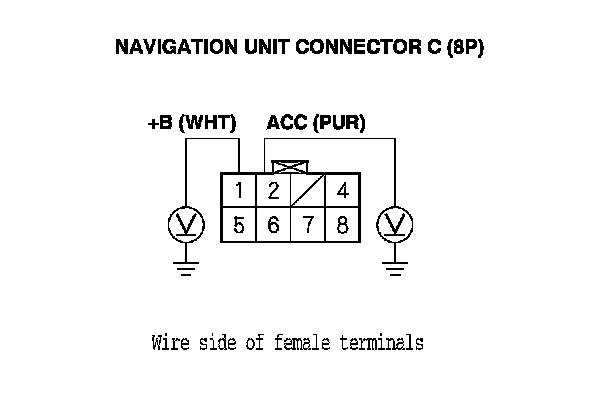
5. Measure the voltage between body ground and navigation unit connector C (8P) terminals No. 1 and No. 2 individually.
Is there battery voltage?
YES - Go to step 6.
NO - If the +B wire does not have voltage, repair open in the wire between the under-dash fuse relay box and the navigation unit. If the ACC wire does not have voltage, repair open in the wire between the under-dash fuse/relay box and the navigation unit.
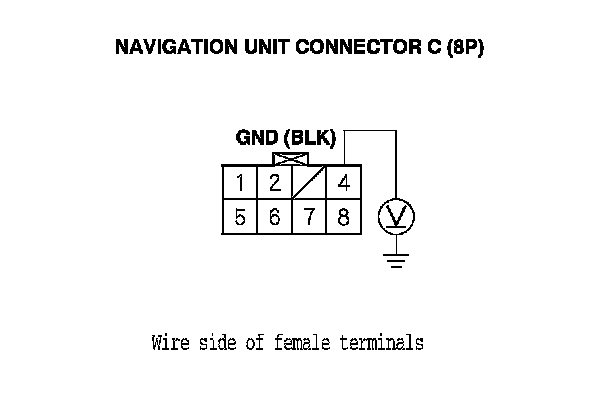
6. Measure the voltage between navigation unit connector C (8P) terminal No. 4 and body ground.
Is there less than 0.5 V?
YES - Go to step 7.
NO - Repair open in the wire between the navigation unit and body ground (G605).
7. Do the forced starting of the display. Navigation System Forced Starting of Display (With Navigation)
Is the diagnosis menu of the picture diagnosis displayed?
YES - Go into the Diagnostic mode, and use the Navi System Link diagnostic Navigation System Diagnostic Mode (With Navigation) to check the links.
NO - Go to step 8.
8. Shield the display unit from the sun with your hand, and check that the display is back lit (only back light is ON.)
Can you see the back light?
YES - Replace the navigation unit Service and Repair and retest. If the problem is still present, replace the navigation display unit. Service and Repair
NO - Go to step 9.
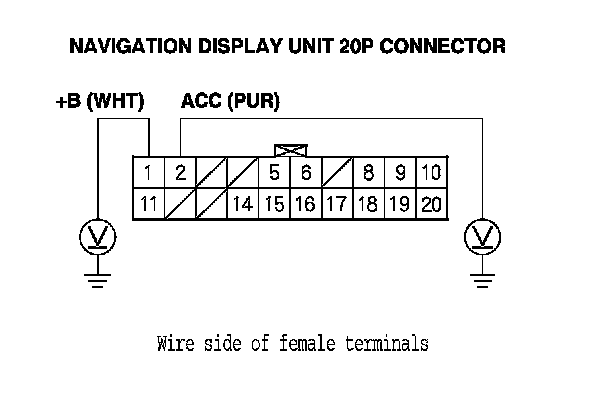
9. Measure the voltage between body ground and the navigation display unit 20P connector terminals No. 1 and No. 2 individually.
Is there battery voltage?
YES - Go to step 10.
NO - If the +B wire does not have voltage, repair open in the wire between the under-dash fuse relay box and the navigation display unit 20P connector. If the ACC wire does not have voltage, repair open in the wire between the under-dash fuse/relay box and the navigation display unit 20P connector.
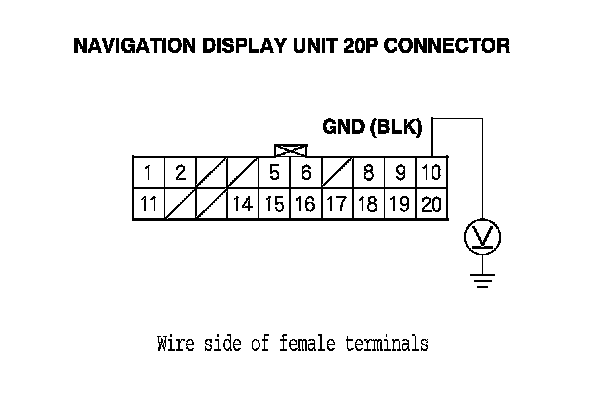
10. Measure the voltage between the navigation display 20P connector terminal No. 10 and body ground.
Is there less than 0.5 V?
YES - Replace the navigation display unit. Service and Repair
NO - Repair open or poor connections between the navigation display and body ground (G506).