B2207
DTC Troubleshooting: B2207
DTC B2207: Navigation Unit Lost Communication with AcuraLink Control Unit
NOTE: Check the vehicle battery condition first.
1. Connect the HDS to the DLC.
2. Clear the DTC with the HDS.
3. Turn the ignition switch to LOCK (0), then turn it ON (II) and wait 30 seconds or more.
4. Check for DTCs with the HDS.
Is DTC B2207, B2208 indicated?
YES - Check the battery condition. Testing and Inspection If the system OK, replace the AcuraLink control unit (XM receiver).
NO -
- If only B2207 is indicated, go to step 5.
- If only B2208 is indicated, refer to the B2208 troubleshooting. B2208
5. Turn the ignition switch to LOCK (0).
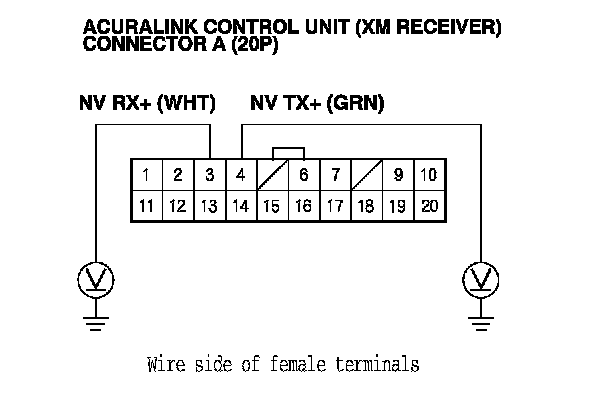
6. Disconnect the AcuraLink control unit (XM receiver) connector A (20P) and navigation unit connector F (5P).
7. Check for continuity between the following terminals of the AcuraLink control unit (XM receiver) connector A (20P) and navigation unit connector F (5P) according to the table.
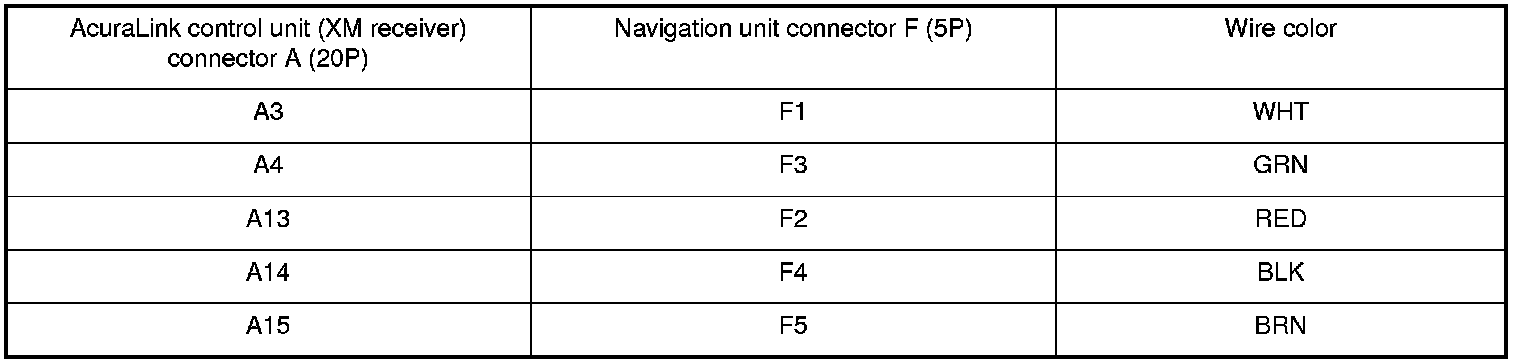
Is there continuity?
YES - Go to step 8.
NO - Repair open in the wire(s) between AcuraLink control unit (XM receiver) and the navigation unit.
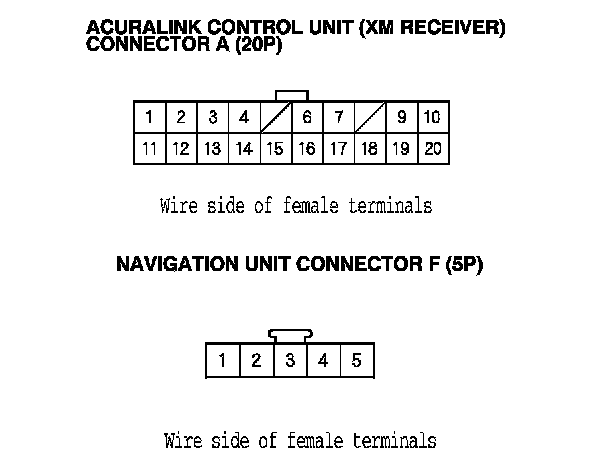
8. Check for continuity between body ground and AcuraLink control unit (XM receiver) connector A (20P) terminals No. 3, 4, 13 and 14 individually.
Is there continuity?
YES - Repair short to body ground in the wire(s) between the AcuraLink control unit (XM receiver) and the navigation unit.
NO - Go to step 9.
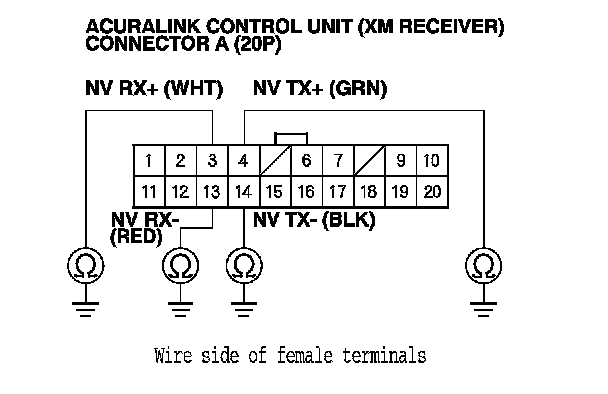
9. Check for continuity between the terminals of AcuraLink control unit (XM receiver) connector A (20P) as follows.
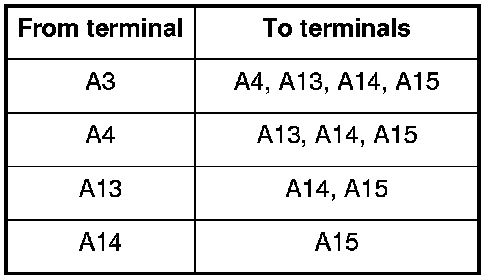
Is there continuity between any of the terminals?
YES - Repair short in the wire(s) between the AcuraLink control unit (XM receiver) and the navigation unit (replace the appropriate shielded harness).
NO - Go to step 10.
10. Turn the ignition switch to ON (II), and measure the same terminals for voltage.
Is there any voltage?
YES - Repair short to power in the wire(s) between the AcuraLink control unit (XM receiver) and the navigation unit.
NO - Go to step 11.
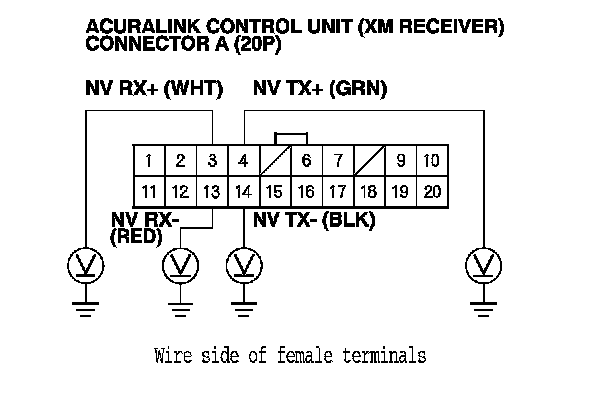
11. Turn the ignition switch to LOCK (0).
12. Reconnect the AcuraLink control unit (XM receiver) connector A (20P).
13. Measure the resistance between AcuraLink control unit (XM receiver) connector A (20P) terminals No. 3, No. 4, and No. 13, No. 14.
Is there less than about 100kOhms?
YES - AcuraLink control unit (XM receiver) is faulty, update the AcuraLink control unit if it does not have the latest software, then recheck. If the software is the latest, replace the AcuraLink control unit. AcuraLink Control Unit (XM Receiver) Removal/Installation (With AcuraLink (USA With Navigation))
NO - Go to step 15.
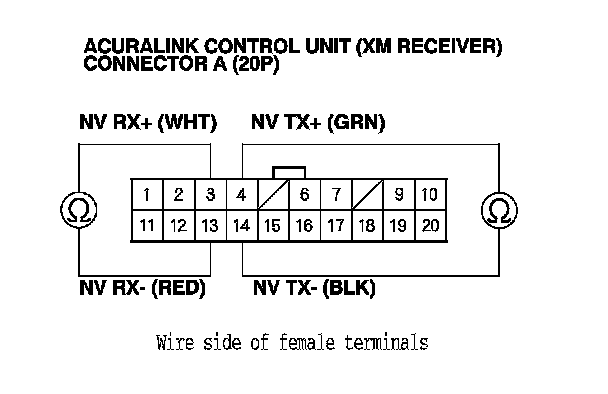
14. Reconnect the navigation unit connector F (5P).
15. Turn the ignition switch to ON (II).
16. Measure the voltage between the body ground and the AcuraLink control unit (XM receiver) connector A (20P) terminals No. 3, No. 4 individually.
Is there less than about 3.5V?
YES - AcuraLink control unit (XM receiver) is faulty, update the AcuraLink control unit if it does not have the latest software, then recheck. If the software is the latest, replace the AcuraLink control unit. AcuraLink Control Unit (XM Receiver) Removal/Installation (With AcuraLink (USA With Navigation))
NO - Navigation unit is faulty, replace the navigation unit.